

How To Write a Flutter Web Plugin: Part 2
A guide for writing modern Flutter Web plugins

Introduction
In Part 1 of this guide, you learned how to add web support to a Flutter plugin using the same technologies that Android and iOS plugins use:
MethodChannels. While this is a viable method for adding web support to a Flutter plugin, it does have some disadvantages.
For one, there is unnecessary overhead of sending plugin method calls over a MethodChannel. On the web, your entire app is compiled into one JavaScript bundle, so the plugin code is needlessly serializing the method call into a byte array, which is then instantly deserialized by the web plugin.
Another disadvantage of using a MethodChannel is that it makes it difficult for the compiler to remove (by tree-shaking) unused plugin code. The web plugin calls the appropriate method based on the name of the method call passed by the
MethodChannel, so the compiler has to assume that all of the methods in the plugin are live, and none of them can be tree-shaken out.
In this article you will learn a different way to add web support for a Flutter plugin. If you plan to add web support to one of the plugins owned by the Flutter team (i.e., a plugin in the
flutter/plugins or FirebaseExtended/flutterfire
repo), then you must implement it this way.
Federated Plugins
Before we walk through how to actually implement a plugin, it’s worth discussing how we structure multi-platform plugins on the Flutter team. We intend for the plugins owned by the Flutter team to be models showing best practices for implementing Flutter plugins. The main difference between the old way of writing Flutter plugins and the new way is that platform-specific implementations are in different packages. We call a plugin implemented in this way a federated plugin.
Advantages
Why split the various implementations across multiple packages rather than combining them all into a single package? There are a few reasons why this is better for the long-term maintainability and growth of a plugin:
-
A plugin author does not need to have domain expertise for every supported Flutter platform (Android, iOS, Web, Mac OS, etc.).
-
You can add support for a new platform without the original plugin author needing to review and pull in your code.
Each package can be maintained and tested separately.
Restructuring your plugin as a federated plugin allows anyone to implement support for new platforms without requiring you to do it yourself. For example, if Flutter supports Nintendo Switch in the future, then a Switch expert can add support for your plugin without you needing to learn all the new APIs. You can even vet the new Switch plugin, and if it meets your standards, you can make it an “endorsed implementation”, meaning that users of your plugin won’t even have to specifically depend on it in order to use it!
Platform Interfaces
How can we implement web support for a plugin without using a MethodChannel? By creating an abstraction that describes exactly what the plugin package (such as
package:url_launcher) requires from its platform-specific implementations (such as package:url_launcher_web). This approach abstracts
how the plugin package communicates with the platform implementation and replaces it with a description of
what behavior and data the plugin package requires from the platform. In the context of Flutter plugins, we call this abstraction a
platform interface.
Example: url_launcher Platform Interface Sketch
To give a concrete example of a platform interface, let’s look at a platform interface that could be defined for
package:url_launcher. Our first web implementation of url_launcher set up a
MethodChannel that listened for calls to the launch method, which took a url
parameter. So, in order for a platform-specific backend to work with package:url_launcher, it needs to implement a method with the signature
Future<bool> launch(String url). A reasonable platform interface for package:url_launcher
would look like this:
abstract class UrlLauncherPlatform {
  /// Launches the given [url]. Completes to [true] if the launch was successful.
  Future<bool> launch(String url);
}
Migrating a Plugin to Use a Platform Interface
In the flutter/plugins GitHub repository, we have adopted a style for writing federated plugins with platform interfaces. You must emulate this style if you want to land a Pull Request adding new platform support to one of the officially-supported plugins. Migrating a plugin to the new federated platform interface format is done in 3 steps (3 PRs):
Add the
<plugin name>_platform_interfacepackage.Migrate the plugin to use the platform interface.
Add a
<plugin name>_webpackage that extends the platform interface.
Let’s work through an example of how this would be done for a real plugin.
Example: Migrating package:url_launcher
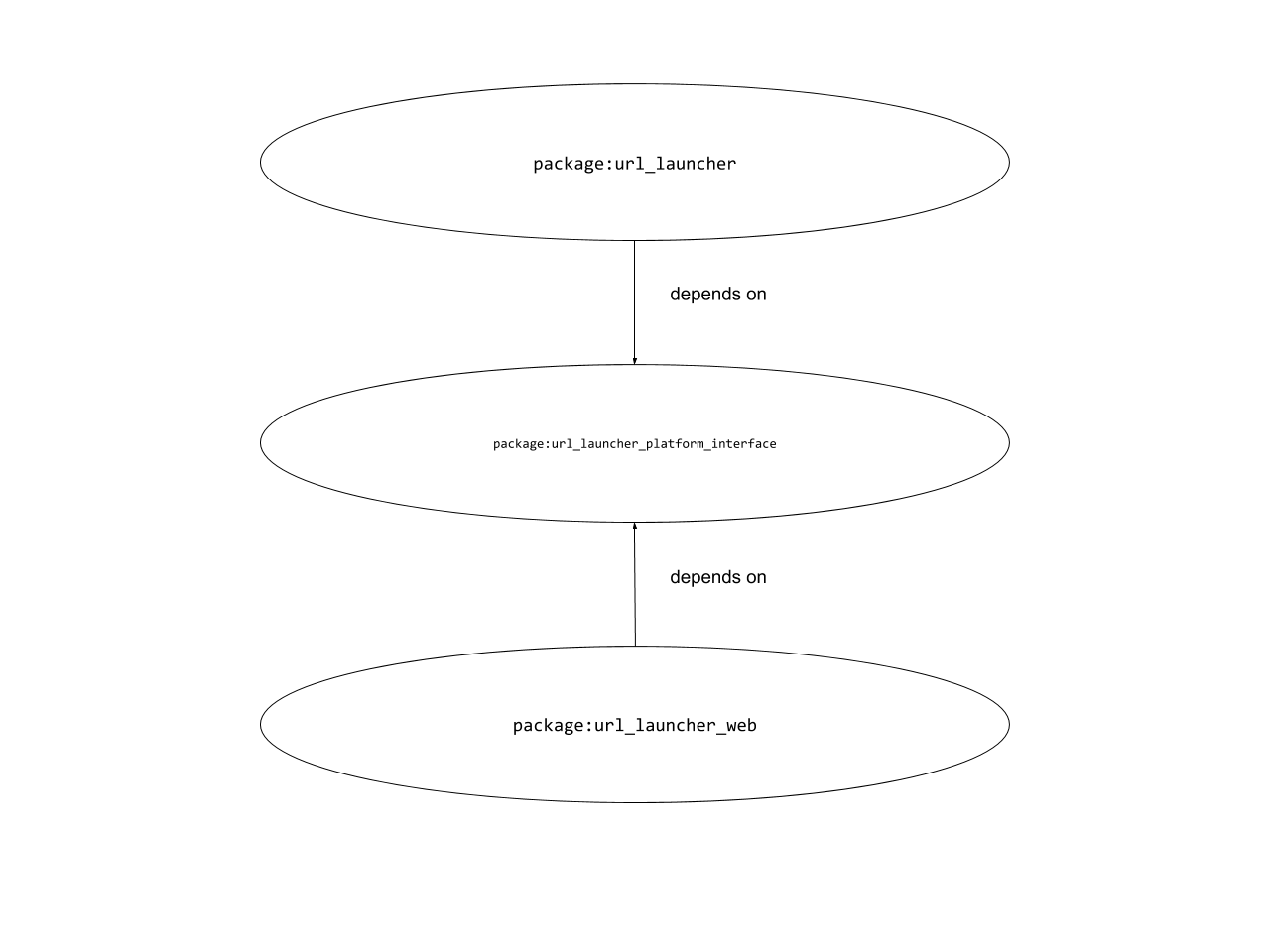
Step 1: Creating the platform interface package
In the first step, we’ll create the platform interface package and rearrange the existing code to use our federated plugin directory layout. For the purposes of this example, we are assuming that the plugin is in a repo that is laid out like the
flutter/plugins GitHub repo (in other words, the plugin lives in a directory like
packages/url_launcher). Specifically, we are assuming a layout that looks like this:
- README.md
- packages/
    - some_other_plugin/
      …
    - url_launcher/
        - pubspec.yaml
        - lib/
           …
        - android/
           …
        - ios/
           …
The gist of this refactoring is that we are creating a directory that holds not only the plugin package, but also the platform interface package and the web package. We want to move
packages/url_launcher to packages/url_launcher/url_launcher and create another package
packages/url_launcher/url_launcher_platform_interface (and eventually create another package
packages/url_launcher/url_launcher_web).
Move url_launcher to its own subdirectory
Assuming you’re in the packages/ directory, you can move the url_launcher plugin to a federated subdirectory by running the following:
$ git mv url_launcher url_launcher_tmp
$ mkdir url_launcher
$ git mv url_launcher_tmp url_launcher/url_launcher
$ git commit -m "Move url_launcher to url_launcher/url_launcher"
Create the url_launcher_platform_interface package
Move to the packages/url_launcher directory we created in the last step. Then create the platform interface package by running:
$ mkdir url_launcher_platform_interface
Now, you need to add a few files in the url_launcher_platform_interface to make it a real package. For the license file, you can usually
git cp the LICENSE from the “plugin package” (in this case package:url_launcher). You should create a
CHANGELOG.md file that contains the following:
## 1.0.0

- Initial open-source release.
You also need to define a pubspec.yaml; you can use the pubspec.yaml
for the actual package:url_launcher_platform_interface as a template. The note about avoiding breaking changes should be included in the
pubspec.yaml of every platform interface package.
Finally, you also need a README.md file. Again, you can use the README.md
in the actual package:url_launcher_platform_interface as a template.
Let’s get to the actual code. Edit the file lib/url_launcher_platform_interface.dart and paste in the following code:
import 'dart:async';
import 'package:plugin_platform_interface/plugin_platform_interface.dart';
import 'method_channel_url_launcher.dart';
/// The interface that implementations of url_launcher must implement.
///
/// Platform implementations should extend this class rather than implement it as `url_launcher`
/// does not consider newly added methods to be breaking changes. Extending this class
/// (using `extends`) ensures that the subclass will get the default implementation, while
/// platform implementations that `implements` this interface will be broken by newly added
/// [UrlLauncherPlatform] methods.
abstract class UrlLauncherPlatform extends PlatformInterface {
/// Constructs a UrlLauncherPlatform.
UrlLauncherPlatform() : super(token: _token);
static final Object _token = Object();
static UrlLauncherPlatform _instance = MethodChannelUrlLauncher();
/// The default instance of [UrlLauncherPlatform] to use.
///
/// Defaults to [MethodChannelUrlLauncher].
static UrlLauncherPlatform get instance => _instance;
/// Platform-specific plugins should set this with their own platform-specific
/// class that extends [UrlLauncherPlatform] when they register themselves.
static set instance(UrlLauncherPlatform instance) {
PlatformInterface.verifyToken(instance, _token);
_instance = instance;
}
/// Launches the given [url]. Completes to [true] if the launch was successful.
Future<bool> launch(String url) {
throw UnimplementedError('launch() has not been implemented.');
}
}
In the code comments above, once again implementers of platform implementations are told to use extends
rather than implements to write their implementations of UrlLauncherPlatform. This is the same warning as in the
pubspec.yaml and README.md files. Not only does the class warn implementers to use
extends rather than implements, it enforces this by extending PlatformInterface. If you’re interested in seeing how
PlatformInterface enforces that subtypes use extends rather than implements, check out
package:plugin_platform_interface. The main thing you should take away from the code above is that you must have the same boilerplate in your platform interface classes in order to prevent implementers from using
implements.
Notice also the instance getter and setter in the platform interface. New platforms can support a plugin by
extending the platform interface and setting their platform-specific class as the default instance. The default instance for any platform interface should always be one that uses
MethodChannel to send the method call on the channel to the platform backend. Defaulting to an implementation backed by a
MethodChannel means that the existing Android and iOS implementations will continue to work by default (as well as web implementations if they were implemented using
MethodChannel as shown in Part 1
of this guide).
The last thing to note is that all of the methods in the platform interface should have a default implementation that just throws an
UnimplementedError. Since every implementation of UrlLauncherPlatform must use
extends, then if a new method is added to the interface, it won’t be a breaking change that causes apps to break. If an implementation used
implements, it would be a breaking change because that implementation would no longer implement every method in the interface.
Creating method_channel_url_launcher.dart
We set the default UrlLauncherPlatform to MethodChannelUrlLauncher in the last step. Now we need to write
MethodChannelUrlLauncher. Edit lib/method_channel_url_launcher.dart and paste in the following:
import 'dart:async';
import 'package:flutter/services.dart';
import 'url_launcher_platform_interface.dart';
const MethodChannel _channel = MethodChannel('plugins.flutter.io/url_launcher');
/// An implementation of [UrlLauncherPlatform] that uses method channels.
class MethodChannelUrlLauncher extends UrlLauncherPlatform {
@override
Future<bool> launch(String url) {
return _channel.invokeMethod<bool>(
'launch',
<String, Object>{
'url': url,
},
);
}
}
If you followed Part 1
of this guide, you will recognize the code to invoke the method on the MethodChannel above. In the next step, when we refactor
package:url_launcher to use package:url_launcher_platform_interface, since the default platform interface uses
MethodChannel to dispatch the calls, all currently existing platforms for package:url_launcher
should continue to work.
Finishing package:url_launcher_platform_interface
With this code written, we are done with package:url_launcher_platform_interface. All that’s left is to commit the new code, submit it to version control (e.g. land a PR on GitHub), and upload the new package to pub.dev. You must submit this package to pub.dev before moving on to the next step because we will be refactoring
package:url_launcher to have a dependency on this new package.
Step 2: Refactoring package:url_launcher to use the platform interface
Now that our platform interface package from Step 1 has been published to pub.dev, let’s use it in package:url_launcher.
Updating dependencies
In the pubspec.yaml for package:url_launcher, add a dependency on url_launcher_platform_interface
as shown below:
name: url_launcher
version: <bump to next minor version>
…
dependencies:
  flutter:
    sdk: flutter
  url_launcher_platform_interface: ^1.0.0
  …
Refactoring all usages of MethodChannel
If you recall from Part 1
of this guide, our (simplified) package:url_launcher contained the following launch()
method:
const MethodChannel _channel = MethodChannel('plugins.flutter.io/url_launcher');
Future<bool> launch(String urlString) async {
assert(urlString != null);
final bool result = await _channel.invokeMethod<bool>(
'launch',
<String, Object>{
'url': urlString,
},
);
...
return result;
}
We need to refactor this to use the platform interface we just defined instead. Change it to the following:
Future<bool> launch(String urlString) async {
  assert(urlString != null);
  final bool result = await UrlLauncherPlatform.instance.launch(urlString);
  ...
  return result;
}
As we covered in the previous section, since the default UrlLauncherPlatform uses MethodChannel, this refactoring is safe. We aren’t changing behavior with this change, just paving the way for platforms to implement
package:url_launcher without using method channels.
Make sure to add an entry to the CHANGELOG.md saying that you are migrating package:url_launcher
to use the platform interface. With this small refactoring done, you can commit your changes, upload
package:url_launcher to pub.dev, and we can move on to writing the implementation of package:url_launcher
for the web platform.
Step 3: Implementing package:url_launcher_web using the platform interface
In Part 1 of this guide, we created a
package:url_launcher_web that uses MethodChannel for communication with the plugin. Let’s refactor this plugin to use the platform interface instead.
Replace the contents of lib/url_launcher_web.dart with the following:
import 'dart:async';
import 'dart:html' as html;
import 'package:flutter_web_plugins/flutter_web_plugins.dart';
import 'package:meta/meta.dart';
import 'package:url_launcher_platform_interface/url_launcher_platform_interface.dart';
/// The web implementation of [UrlLauncherPlatform].
///
/// This class implements the `package:url_launcher` functionality for the web.
class UrlLauncherPlugin extends UrlLauncherPlatform {
/// Registers this class as the default instance of [UrlLauncherPlatform].
static void registerWith(Registrar registrar) {
UrlLauncherPlatform.instance = UrlLauncherPlugin();
}
@override
Future<bool> launch(String url) {
return Future<bool>.value(html.window.open(url, '') != null);
}
}
Note how we have changed UrlLauncherPlugin to extend UrlLauncherPlatform. We still have the
registerWith() method from before, but now instead of registering a MethodChannel, we instead register that this is the default instance of
UrlLauncherPlatform. Now, in package:url_launcher when it calls UrlLauncherPlatform.instance.launch()
it will call the launch() method we define here.
We touched on the advantages of using a platform interface above, but here we can see it more clearly. Note how we are no longer serializing and deserializing every method call to the plugin, we are simply calling a method. Writing platform-specific implementations for a plugin no longer requires understanding Flutter’s
MethodChannel APIs, it is clear that this class is implementing all the necessary functionality to get
package:url_launcher working on the web.
Platform Interface Design Principles
The example above is very simple; the platform interface has only one method. In this section we’ll cover some general principles to keep in mind when creating a platform interface package for a plugin. If you keep these principles in mind, creating a platform interface package for a plugin is straightforward in almost all cases.
Make a 1:1 mapping with MethodChannel calls
In the ideal case, you can design a platform interface for a plugin by finding everywhere the plugin calls the
MethodChannel and making a method in the platform interface corresponding to each call. That’s what we did in the
package:url_launcher example above. This makes it very simple to implement the default platform interface implementation backed by a
MethodChannel since each method in the platform interface corresponds exactly to a MethodChannel
call. This also makes it trivial to refactor the plugin package to use the platform interface: simply replace each
MethodChannel call with the corresponding call on the platform interface.
Keep the platform interface package minimal
Avoid bringing abstractions from the plugin package into the platform interface package. This allows the plugin package to be more flexible.
To give an example, suppose that instead of a launch() method, the package:url_launcher
interface looked like this:
class UrlLauncher {
final String url;
const UrlLauncher(this.url);
Future<bool> launch() {
// Contains a method channel call to launch the url
}
}
Suppose further that we mimicked this API in the platform interface, resulting in something like:
class UrlLauncherPlatform {
Launcher createLauncher(String url);
}
class Launcher {
Future<bool> launch();
}
Now we won’t be able to refactor package:url_launcher to a different API without also refactoring
package:url_launcher_platform_interface. If package:url_launcher_platform_interface
followed the advice above and just had a method for each MethodChannel call, then the fake API for
package:url_launcher above and the actual API will both be simple to implement via the platform implementation.
Enforce that implementers use extends
We’ve mentioned it a few times already in this article, but it is a very important point that bears repeating. Make sure you use
package:plugin_platform_interface to enforce that implementers of your platform interface use
extends rather than implements. Read more about implementing federated plugins
for background information on why implements is a bad idea for platform interfaces.
Conclusion
Whether you are writing a new plugin or adding web support to an existing one, using a platform interface will future-proof your plugin and make it much easier to extend and maintain in the long run. In this article you learned how to refactor your plugin to use a platform interface, and how to write a web plugin using that interface. Now go forth and write your plugins!
More from Flutter

Best practices for optimizing Flutter web loading speed
As a Flutter developer working with the Google Flutter team and personally in my private time, I encounter and understand the concerns…

Learn Flutter for free with Flutter Apprentice!
A free book for learning Flutter, available for a time-limited period.
