How we built a Flutter-powered AI coffee shop
If you start giving away coffee, people will show up. The Flutter team had been trying for a while to find a way to put this principle to…


If you start giving away coffee, people will show up. The Flutter team had been trying for a while to find a way to put this principle to work with a demo that started with a Flutter app and ended with a hot, tasty beverage. The problem was how to make it more interesting, more personal than just taking orders and delivering. Coffee’s cool, but it’s not The One Thing You Definitely Remember from Google I/O cool.
So what changed? Two new bits of tech arrived on scene. One is Nano Banana, with its ability to quickly generate customized images. The second is GenUI, with its ability to generate UX dynamically at runtime and offer attendees personally tailored questions about how they’d like to modify those images. Put the two together with Flutter and you can offer folks the chance to order coffee with an image of their happy place printed on top with an inkjet printer. Now that’s pretty memorable.
All we had to do was execute. Twice, as it turned out — the demo was called “GenLatte” at Cloud Next and “Antigravity Coffee Co.” at Google I/O. For simplicity and to save a few tokens for the agent summarizing this article for you, the name “GenLatte” is used below.
We built a coffee shop
Realizing a vision as ambitious as GenLatte involves a lot of people. Like, a lot of people. There are teams to spec out the physical space and decide how “customers” [1] will flow. There are branding and concept teams to create the aesthetic. There are of course construction teams to go to the hardware store and buy lumber. Eventually, there’s also the software engineers slapping code together to build the various apps, which is where I happened to come in. This blog post will only outline the software, but that is not to minimize the incredible work that went into the many other layers required for GenLatte to eventually open its doors.
[1] Are they still customers if you don’t charge anything?
How GenLatte works
At its core, GenLatte is a Flutter app with a Firebase backend.
Zooming in one step further, it’s a monorepo with separate Flutter, Firebase, and shared code projects. Using a monorepo allows us to deduplicate dependencies, share business logic, and execute atomic deployments. The Flutter app also runs on iOS and Android, but customers only ever interacted with the web version. We used Cloud Build and Firebase Hosting to keep our deployment story from being Someone runs $firebase deploy on their laptop. On the server, we have a mix of trigger functions and HTTP callables, giving the app flexibility between explicit data flows and reactive data management.
Within the Flutter app itself, we built 5 separate UIs: the kiosk screen where sleepy conference attendees order a coffee, a barista screen to show fresh orders, a moderator screen to verify the safety of each submission, a large queue screen to give customers a sense of when to expect their drink, and a purely whimsical “recent orders” screen to show the last 13 orders as floating bubbles and allow everyone a final chance to appreciate their digital creation.
Demo-grade security
One of Google’s principal concerns in any demo featuring user-generated content is preventing volunteers from graciously donating their red-teaming expertise to publish inappropriate content for public consumption. In practice, this materializes into several distinct concerns:
-
Preventing authorized users from creating NSFW content: To prevent this, GenLatte implemented a three-tiered approach. First, raw “happy place” strings were sent to Gemini Flash for quick moderation, along with thirty or so examples outlining which unsavory topics we wanted to block. Then, once a happy place was approved, we started generating images and relied on Nano Banana’s own internal training to only produce SFW content. At the end of the process, our human moderator would manually approve each image. With this all in place, we were quite confident that GenLatte wouldn’t embarrass Google.
-
Preventing the spoofing of admin accounts: Another way authorized users can potentially break your app is to visit screens that grant elevated permissions you did not intend to share. Given GenLatte’s back-of-house moderator and barista screens, it obviously ran this risk. Our choice to deploy to the web, where users can arbitrarily navigate using the browser URL bar, further increased pressure. To solve this, our GoRouter implementation features centralized, declarative routing checks to ensure that every page visit is legal for the given account, as determined by Firebase custom claims.
-
Preventing unauthorized writes to Firestore: Authorized users using the app is one thing, but someone reading the contents of
firebase_options.dart, starting a new project, and seeing what havoc they can wreak, is another. To prevent this, we tied all reads and writes to strict account credentials with tight security rules, which you can use as inspiration for your own projects.
Delivering fun images
Once we convinced ourselves that our app wouldn’t be hacked on the demo stage floor, we got to making sure that Gemini could deliver consistent images that would look great on coffee. This portion of the project might have involved gratuitously over-caffeinated afternoons at the office, so it’s probably no surprise that we zipped through it.
At its core, our system involved upscaling the user’s happy place, a prompt capped at 50 characters but often no more than a word or two, into four unique and highly specific image requests. For example, for a user who entered a happy place of “at home with my family”, GenLatte might ask Nano Banana for an image of “A quaint home in the woods with a fire in the fireplace and dinner waiting on the table. The home is full of family and friends, all celebrating and enjoying each other’s company. The lighting and mood is…” (so on and so forth). Gemini handled this upscaling, meaning the four prompts were all different; delivering the variety of images that users saw within the app.
We also optimized Nano Banana for pleasing compositions; specifically, “a leading S curve toward the subject”, which rotated between roads, rivers, hills, coastlines, or other abstractions. This prompting trick greatly increased Nano Banana’s percentage of appealing, usable images.


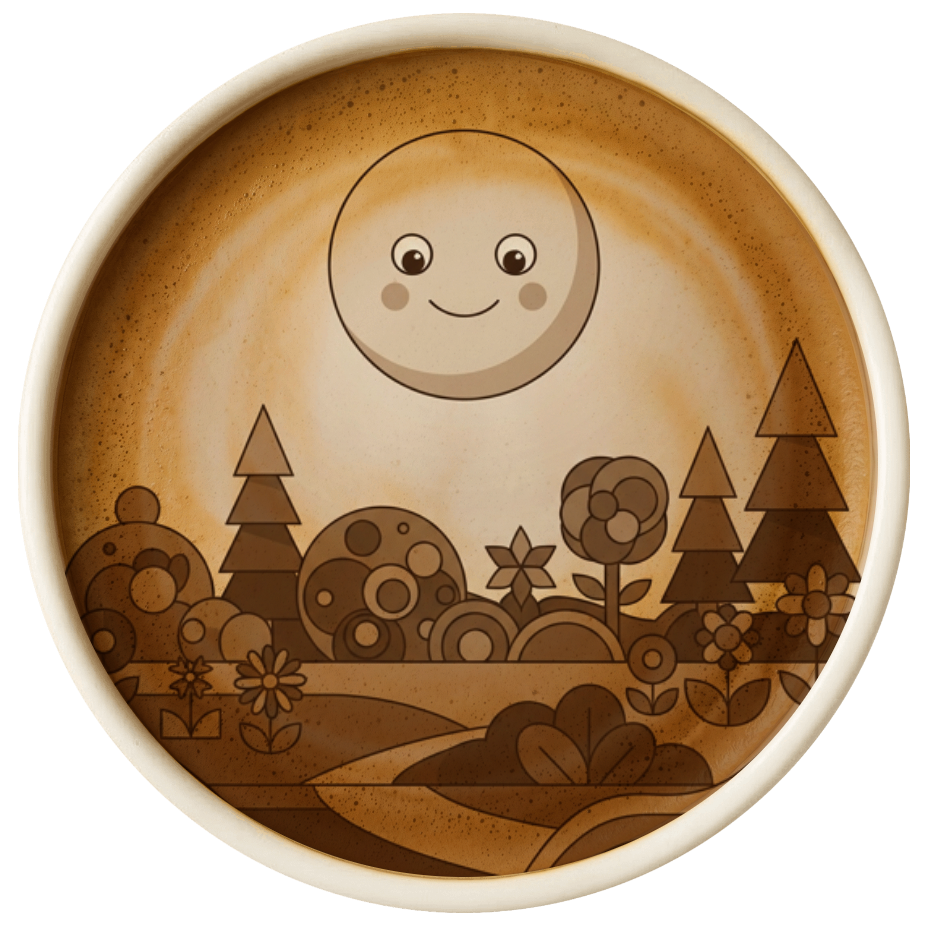
For GenLatte’s second appearance, as Antigravity Coffee Co, at I/O in Mountain View this May, we updated our prompts to rotate through different suggested compositions. This kept things fresh for both event staff seeing hundreds of images per day and individual guests who simply wanted an evocative image for their coffee.
Modifying the images in real time
GenLatte’s true magic didn’t just come from whipping up an image and printing it on to coffee; but from specifically dialing it in to the person’s exact tastes. Behind that Tweak button were four questions, pre-written by Gemini, for how the image might be modified.
These images were derived from the original, upscaled prompt itself; so returning to our cozy family happy place from earlier, Gemini might have provided questions about what type of food was on the table, whether there were more or fewer people, or whether the celebration was for any specific life event. The other “at home with my family” happy places the user saw might have gone in different directions, and so tweaking those selections would have surfaced different questions appropriate for those images.
Once the user’s answers were in, we went back to Nano Banana with the same prompt, submitted multiple times concurrently, to get new art. The prompt looked something like this:
After seeing an image derived from this original prompt:

{{original_prompt}}

The user requested these changes:

{{questions[0].body}}: {{questions[0].answer}}
{{questions[1].body}}: {{questions[1].answer}}
{{questions[2].body}}: {{questions[2].answer}}
{{questions[3].body}}: {{questions[3].answer}}

Please generate this new image.
From Las Vegas to Mountain View, it was magical for us, after months of building GenLatte, to see people’s faces light up at their modified images!
A2UI and GenLatte
GenLatte is not just a Flutter and Firebase demo, or even a generative AI demo; but a GenUI demo. GenUI can come in many different forms, but for GenLatte, it connected the dots between showing users the correct user interface to answer one of Gemini’s questions. The key detail is that not all questions are best served by the same UI. A question like “Is your family celebrating a specific life event?” is open-ended, and so requires a text field; but “What time of day is this?” probably only has a few relevant options, and so is best served by a radio button.
There are a range of ways to implement GenUI in an app. On the conservative end are tightly controlled, on-rails experiences where the agent chooses from a coarse-grain widget catalog to render predictable UIs. More adventurous apps can give their agents more freedom, composing UIs from finer-grain catalogs to render just about anything imaginable. For GenLatte, we landed on the conservative end: exposing a small catalog of branded widgets that the agent could use to display questions. That gave Gemini the ability to choose the right one for the moment while making sure the overall composition stayed within our design guidelines.
If you’d like to see what Gemini can do with more freedom, check out Hatcha, a party-planning app. It goes much further into GenUI by delegating significantly more runtime responsibility to Gemini.
Three thousand coffees later…
After serving 1,200 lattes at Google Cloud Next and another 1,800 at Google I/O, it’s safe to say that GenLatte was a success. I’ve scarcely been more caffeinated than I was while building this demo or staffing it at both events, nor have I seen more delighted smiles on faces immediately after using an app.
Flutter made the whimsical UI a delight to build; from its elegant support for dynamic layouts and custom shaders, to its ability to seamlessly target multiple platforms. Firebase made the backend a breeze: handling deployment and scaling headaches for us and offering reactive, full-stack data binding. Gemini and Nano Banana (of course) turned our users’ happy place prompts into fantastical art that was a delight to see take physical form. And of course, the true hero of the operation, our baristas, made excellent lattes — because the whole thing would have been a flop if the coffee wasn’t any good!
To read GenLatte’s code, visit its folder in the flutter/demos repository. However, be warned, code in that repository is unmaintained and offered for inspirational purposes only.
We’re ecstatic about the future of app development in 2026. With tools like Flutter, Firebase, and Gemini; the scope of experiences you can realistically deliver your users has grown exponentially.
To get started with GenUI yourself, visit Flutter’s documentation. Let us know if you have an idea for how you might use these patterns in your own work, and until then — we can’t wait to see what you build!