

Out of Depth with Flutter
How reactive programming, widget composition, and UI-as-code might bury your view logic in deep nesting, and what you can do about it.

Flutter is a new framework for building high-quality native apps for iOS and Android in record time. In my experience using Flutter (as a member of the Flutter team), development speed is achieved primarily through the following:
-
Stateful hot reload. The Flutter development experience is powered by Dart compiler/VM technology, allowing you to load code changes into a running app while retaining the app state (including the place you’ve navigated to). Hit save and you’ll see the effect of the change on device in less than a second.
-
Reactive programming. Flutter follows other modern frameworks in its approach to defining and updating the user interface: both happen based on a single description of how the interface depends on current state.
-
Composition. In Flutter, everything is a widget, and you achieve any desired outcome by freely composing focused widgets, Lego brick style.
-
UI as code. Flutter does not come with a separate layout markup language. Each widget is written in Dart only, in one place, eliminating syntax switching and file switching overhead.
Interestingly, the last three bullets above conspire to form a challenge to development speed: losing your way and your view logic inside deeply nested widget trees.
Below I’ll discuss why this issue arises and what you can do about it. Along the way I’ll try to shed some light on how Flutter works.
Reactive programming
Flutter’s reactive programming model invites you to use declarative programming to define your user interface, as a function of current state:
@override
Widget build(BuildContext context) {
  **return** // *some widget based on current state*
}
Widgets are immutable descriptions of user interface. We are asked to return a single widget defined by a single expression. There is no sequence of mutator commands to configure or update a mutable view. Instead, we just call some widget constructor.
Composition
Widgets are typically simple, each doing one thing well: Text, Icon, Padding,
Center, Column, Row, … To achieve any non-trivial outcome, many widgets must be composed. So our single expression easily becomes a deeply nested tree of widget constructor calls:
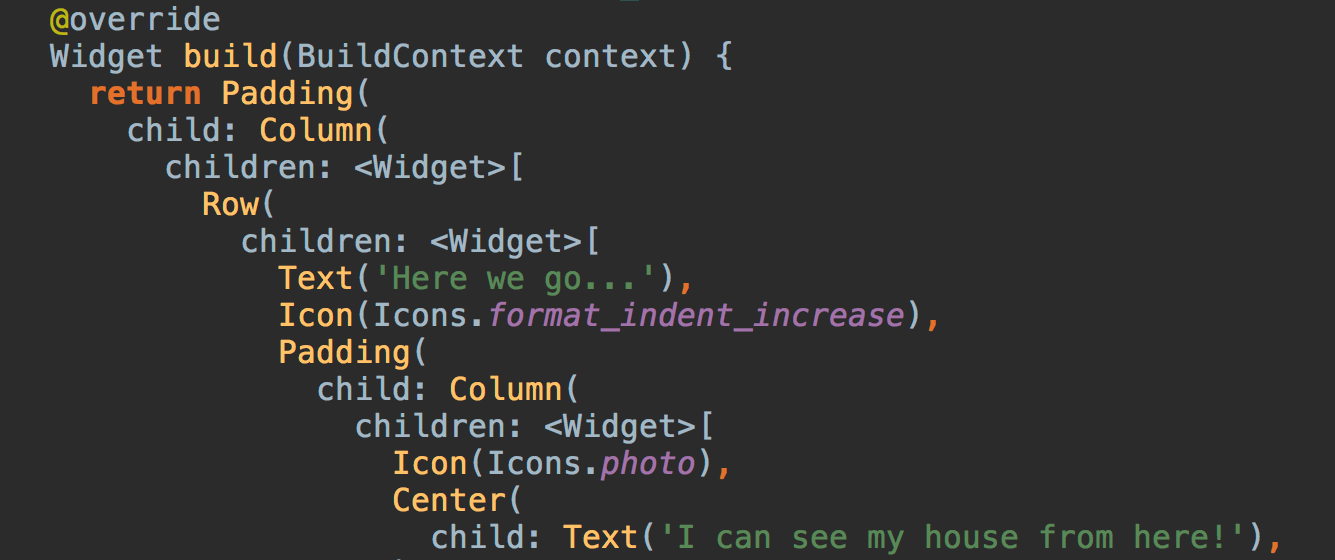
Widgets have properties other than child/children, but you get the idea.
UI as code
Writing and editing deeply nested trees requires a decent editor and a bit of practice to become efficient. Developers seem to tolerate deep nesting better in layout markup (XML, HTML) than in code, but Flutter’s UI-as-code approach does mean deeply nested code. Whatever view logic you might have inside your widget tree — conditionals, transformations, iterations used while reading current state, event handlers used for changing it — also gets deeply nested.
And that, then, is the challenge.
The challenge
The flutter.io layout tutorial provides an illustrative example using — so it seems — a lake explorer app.
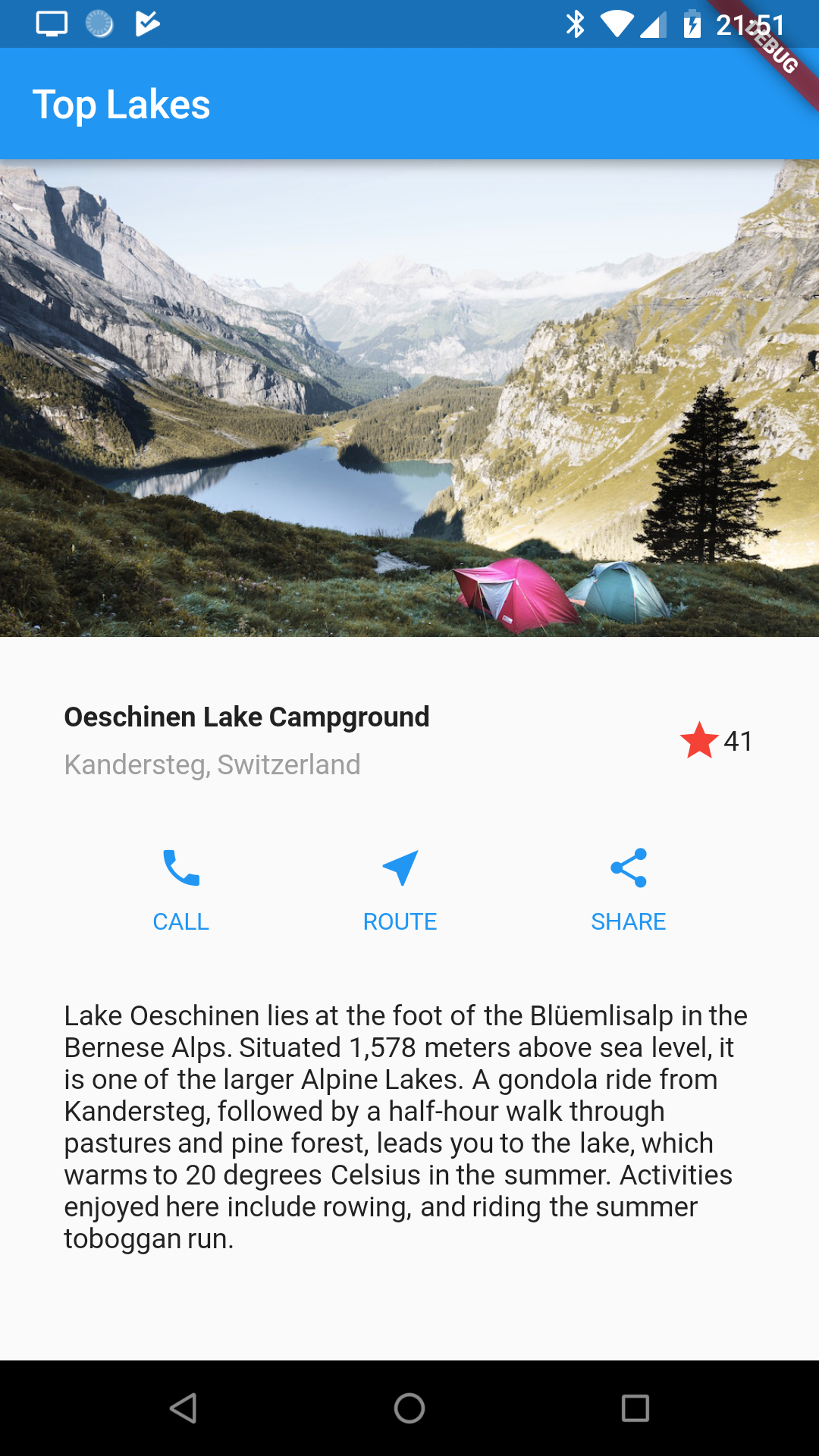
Here is a raw widget tree implementing this view:
import 'package:flutter/material.dart';
void main() {
runApp(MyApp());
}
class MyApp extends StatelessWidget {
@override
Widget build(BuildContext context) {
return MaterialApp(
title: 'Flutter Demo',
home: Scaffold(
appBar: AppBar(title: Text('Top Lakes')),
body: ListView(
children: <Widget>[
Image.asset(
'images/lake.jpg',
width: 600.0,
height: 240.0,
fit: BoxFit.cover,
),
Container(
padding: const EdgeInsets.all(32.0),
child: Row(
children: <Widget>[
Expanded(
child: Column(
crossAxisAlignment: CrossAxisAlignment.start,
children: <Widget>[
Container(
padding: const EdgeInsets.only(bottom: 8.0),
child: Text(
'Oeschinen Lake Campground',
style: TextStyle(fontWeight: FontWeight.bold),
),
),
Text(
'Kandersteg, Switzerland',
style: TextStyle(color: Colors.grey[500]),
),
],
),
),
Row(
children: <Widget>[
Icon(Icons.star, color: Colors.red[500]),
Text('41'),
],
),
],
),
),
Container(
child: Row(
mainAxisAlignment: MainAxisAlignment.spaceEvenly,
children: <Widget>[
Column(
mainAxisSize: MainAxisSize.min,
mainAxisAlignment: MainAxisAlignment.center,
children: <Widget>[
Icon(Icons.call, color: Theme.of(context).primaryColor),
Container(
margin: const EdgeInsets.only(top: 8.0),
child: Text(
'CALL',
style: TextStyle(
fontSize: 12.0,
fontWeight: FontWeight.w400,
color: Theme.of(context).primaryColor,
),
),
),
],
),
Column(
mainAxisSize: MainAxisSize.min,
mainAxisAlignment: MainAxisAlignment.center,
children: <Widget>[
Icon(Icons.near_me,
color: Theme.of(context).primaryColor),
Container(
margin: const EdgeInsets.only(top: 8.0),
child: Text(
'ROUTE',
style: TextStyle(
fontSize: 12.0,
fontWeight: FontWeight.w400,
color: Theme.of(context).primaryColor,
),
),
),
],
),
Column(
mainAxisSize: MainAxisSize.min,
mainAxisAlignment: MainAxisAlignment.center,
children: <Widget>[
Icon(Icons.share, color: Theme.of(context).primaryColor),
Container(
margin: const EdgeInsets.only(top: 8.0),
child: Text(
'SHARE',
style: TextStyle(
fontSize: 12.0,
fontWeight: FontWeight.w400,
color: Theme.of(context).primaryColor,
),
),
),
],
),
],
),
),
Container(
padding: const EdgeInsets.all(32.0),
child: Text(
'Lake Oeschinen lies at the foot of the Blüemlisalp in the '
'Bernese Alps. Situated 1,578 meters above sea level, it '
'is one of the larger Alpine Lakes. A gondola ride from '
'Kandersteg, followed by a half-hour walk through pastures '
'and pine forest, leads you to the lake, which warms to '
'20 degrees Celsius in the summer. Activities enjoyed here '
'include rowing, and riding the summer toboggan run.',
softWrap: true,
),
),
],
),
),
);
}
}
This is just a static widget tree, implementing no behavior. But embedding your view logic directly into such a tree might not be a pleasant experience.
Challenge accepted.
UI as code, revisited
With Flutter’s UI-as-code approach, the widget tree is, well, just code. So we can employ all of our usual code organizing tools to improve the situation. One of the simplest tools in the box is naming subexpressions. This turns the widget tree inside out, syntactically. Instead of
**return** A(B(C(D(), E())), F());
we might name every subexpression and get
**final** Widget d = D();
**final** Widget e = E();
**final** Widget c = C(d, e);
**final** Widget b = B(c);
**final** Widget f = F();
**return** A(b, f);
Our lake app can be rewritten as follows:
import 'package:flutter/material.dart';
void main() {
runApp(MyApp());
}
class MyApp extends StatelessWidget {
@override
Widget build(BuildContext context) {
final Widget imageSection = Image.asset(
'images/lake.jpg',
width: 600.0,
height: 240.0,
fit: BoxFit.cover,
);
final Widget titles = Column(
crossAxisAlignment: CrossAxisAlignment.start,
children: <Widget>[
Container(
padding: const EdgeInsets.only(bottom: 8.0),
child: Text(
'Oeschinen Lake Campground',
style: TextStyle(fontWeight: FontWeight.bold),
),
),
Text(
'Kandersteg, Switzerland',
style: TextStyle(color: Colors.grey[500]),
),
],
);
final Widget stars = Row(
children: <Widget>[
Icon(Icons.star, color: Colors.red[500]),
Text('41'),
],
);
final Widget titleSection = Container(
padding: const EdgeInsets.all(32.0),
child: Row(
children: <Widget>[
Expanded(child: titles),
stars,
],
),
);
final Widget callAction = Column(
mainAxisSize: MainAxisSize.min,
mainAxisAlignment: MainAxisAlignment.center,
children: <Widget>[
Icon(Icons.call, color: Theme.of(context).primaryColor),
Container(
margin: const EdgeInsets.only(top: 8.0),
child: Text(
'CALL',
style: TextStyle(
fontSize: 12.0,
fontWeight: FontWeight.w400,
color: Theme.of(context).primaryColor,
),
),
),
],
);
final Widget routeAction = Column(
mainAxisSize: MainAxisSize.min,
mainAxisAlignment: MainAxisAlignment.center,
children: <Widget>[
Icon(Icons.near_me, color: Theme.of(context).primaryColor),
Container(
margin: const EdgeInsets.only(top: 8.0),
child: Text(
'ROUTE',
style: TextStyle(
fontSize: 12.0,
fontWeight: FontWeight.w400,
color: Theme.of(context).primaryColor,
),
),
),
],
);
final Widget shareAction = Column(
mainAxisSize: MainAxisSize.min,
mainAxisAlignment: MainAxisAlignment.center,
children: <Widget>[
Icon(Icons.share, color: Theme.of(context).primaryColor),
Container(
margin: const EdgeInsets.only(top: 8.0),
child: Text(
'SHARE',
style: TextStyle(
fontSize: 12.0,
fontWeight: FontWeight.w400,
color: Theme.of(context).primaryColor,
),
),
),
],
);
final Widget actionSection = Container(
child: Row(
mainAxisAlignment: MainAxisAlignment.spaceEvenly,
children: <Widget>[
callAction,
routeAction,
shareAction,
],
),
);
final Widget textSection = Container(
padding: const EdgeInsets.all(32.0),
child: Text(
'Lake Oeschinen lies at the foot of the Blüemlisalp in the '
'Bernese Alps. Situated 1,578 meters above sea level, it '
'is one of the larger Alpine Lakes. A gondola ride from '
'Kandersteg, followed by a half-hour walk through pastures '
'and pine forest, leads you to the lake, which warms to '
'20 degrees Celsius in the summer. Activities enjoyed here '
'include rowing, and riding the summer toboggan run.',
softWrap: true,
),
);
final Widget scaffold = Scaffold(
appBar: AppBar(title: Text('Top Lakes')),
body: ListView(
children: <Widget>[
imageSection,
titleSection,
actionSection,
textSection,
],
),
);
return MaterialApp(
title: 'Flutter Demo',
home: scaffold,
);
}
}
The indentation levels are now more reasonable, and we can make the subtrees as shallow as we want by introducing more names. Even better, by giving meaningful names to individual subtrees, we communicate the role of each. So we can now talk about the
xxxAction subtrees… and observe that we have a lot of code duplication across those! Another basic code organizing tool — functional abstraction — takes care of that:
import 'package:flutter/material.dart';
void main() {
runApp(MyApp());
}
class MyApp extends StatelessWidget {
@override
Widget build(BuildContext context) {
final Widget imageSection = ...
final Widget titles = ...
final Widget stars = ...
final Widget titleSection = ...
Widget action(String label, IconData icon) {
final Color color = Theme.of(context).primaryColor;
return Column(
mainAxisSize: MainAxisSize.min,
mainAxisAlignment: MainAxisAlignment.center,
children: <Widget>[
Icon(icon, color: color),
Container(
margin: const EdgeInsets.only(top: 8.0),
child: Text(
label,
style: TextStyle(
fontSize: 12.0,
fontWeight: FontWeight.w400,
color: color,
),
),
),
],
);
}
final Widget actionSection = Container(
child: Row(
mainAxisAlignment: MainAxisAlignment.spaceEvenly,
children: <Widget>[
action('CALL', Icons.call),
action('ROUTE', Icons.near_me),
action('SHARE', Icons.share),
],
),
);
final Widget textSection = ...
final Widget scaffold = ...
return MaterialApp(
title: 'Flutter Demo',
home: scaffold,
);
}
}
We’ll see a more Fluttery alternative to plain functional abstraction in a bit.
Composition, revisited
What next? Well, the build method is still rather long. Maybe we can extract some meaningful pieces… Pieces? Widgets! Flutter widgets are all about composition and reuse. We have composed a complex widget from simple ones provided by the framework. But finding the result too complex, we can opt to decompose it into less complex, custom widgets. Custom widgets are first-class citizens in the Flutter world, and sharply defined widgets have great reuse potential. Let’s turn the
action function into an Action widget type and place it in a file of its own:
import 'package:flutter/material.dart';
import 'src/widgets.dart';
void main() {
runApp(MyApp());
}
class MyApp extends StatelessWidget {
@override
Widget build(BuildContext context) {
final Widget imageSection = ...
final Widget titles = ...
final Widget titleSection = ...
final Widget actionSection = Container(
child: Row(
mainAxisAlignment: MainAxisAlignment.spaceEvenly,
children: <Widget>[
Action(label: 'CALL', icon: Icons.call),
Action(label: 'ROUTE', icon: Icons.near_me),
Action(label: 'SHARE', icon: Icons.share),
],
),
);
final Widget textSection = ...
final Widget scaffold = ...
return MaterialApp(
title: 'Flutter Demo',
home: scaffold,
);
}
}
import 'package:flutter/material.dart';
class Action extends StatelessWidget {
Action({Key key, this.label, this.icon}) : super(key: key);
final String label;
final IconData icon;
@override
Widget build(BuildContext context) {
final Color color = Theme.of(context).primaryColor;
return Column(
mainAxisSize: MainAxisSize.min,
mainAxisAlignment: MainAxisAlignment.center,
children: <Widget>[
Icon(icon, color: color),
Container(
margin: const EdgeInsets.only(top: 8.0),
child: Text(
label,
style: TextStyle(
fontSize: 12.0,
fontWeight: FontWeight.w400,
color: color,
),
),
),
],
);
}
}
Now we can reuse the Action widget anywhere in our app, precisely as if it was defined by the Flutter framework.
But hey, wouldn’t a top-level action function serve the same need?
In general, no.
-
Many widgets are constructed from other widgets; their constructors have
childandchildrenparameters typedWidgetandList<Widget>. So theactionfunction cannot be passed to any of those. Of course, the result of invokingactioncan. But then you would pass a widget tree pre-built in the current build context, rather than aStatelessWidgetthat builds its subtree only if needed and in the context defined by wherever it ends up in the overall tree. Noticed the expressionTheme.of(context).primaryColorat the start ofAction.build? It retrieves the primary color from the nearestThemewidget up the parent chain — which may well be different from the nearestThemeat the point whereactionwould be invoked. -
Actionis defined as aStatelessWidgetwhich is little more than a build function turned into an instance method. But there are other kinds of widget with more elaborate behavior. Clients ofActionshouldn’t care what kind of widgetActionis. As an example, if we wanted to endowActionwith an intrinsic animation, we might have to turn it into aStatefulWidgetto manage the animation state. The rest of the app should be unaffected by such a change.
Reactive programming, revisited
State management is the cue to start taking advantage of Flutter’s reactive programming model and make our static view come alive. Let’s define the state of the app. We’ll keep it simple, and assume a
Lake business logic class whose only mutable state is whether the user has starred it:
**abstract class** Lake {
  String **get** imageAsset;
  String **get** name;
  String **get** locationName;
  String **get** description;

  int get starCount;
  bool get isStarred;
  void toggleStarring();

  void call();
  void route();
  void share();
}
We can then construct our widget tree dynamically from a Lake instance and, as part of that, set up event handlers to call its methods. The beauty of the reactive programming model is that we only have to do this once in the code base. The Flutter framework will rebuild our widget tree whenever the
Lake instance changes — provided we tell the framework about it. That requires making MyApp
a StatefulWidget which in turn involves delegating widget building to an associated State
object and then calling the State.setState method whenever we toggle starring on our Lake.
import 'package:flutter/material.dart';
import 'src/lake.dart';
import 'src/widgets.dart';
void main() {
// Pretend we get a Lake instance from business logic.
final Lake lake = Lake();
runApp(MyApp(lake));
}
class MyApp extends StatefulWidget {
final Lake lake;
MyApp(this.lake);
@override
MyAppState createState() => new MyAppState();
}
class MyAppState extends State<MyApp> {
@override
Widget build(BuildContext context) {
final Lake lake = widget.lake;
final Widget imageSection = Image.asset(
lake.imageAsset,
width: 600.0,
height: 240.0,
fit: BoxFit.cover,
);
final Widget titles = Column(
crossAxisAlignment: CrossAxisAlignment.start,
children: <Widget>[
Container(
padding: const EdgeInsets.only(bottom: 8.0),
child: Text(
lake.name,
style: TextStyle(fontWeight: FontWeight.bold),
),
),
Text(
lake.locationName,
style: TextStyle(color: Colors.grey[500]),
),
],
);
final Widget stars = GestureDetector(
child: Row(
children: <Widget>[
Icon(
lake.isStarred ? Icons.star : Icons.star_border,
color: Colors.red[500],
),
Text('${lake.starCount}'),
],
),
onTap: () {
setState(() {
lake.toggleStarring();
});
},
);
final Widget titleSection = Container(
padding: const EdgeInsets.all(32.0),
child: Row(
children: <Widget>[
Expanded(child: titles),
stars,
],
),
);
final Widget actionSection = Container(
child: Row(
mainAxisAlignment: MainAxisAlignment.spaceEvenly,
children: <Widget>[
Action(label: 'CALL', icon: Icons.call, handler: lake.call),
Action(label: 'ROUTE', icon: Icons.near_me, handler: lake.route),
Action(label: 'SHARE', icon: Icons.share, handler: lake.share),
],
),
);
final Widget textSection = Container(
padding: const EdgeInsets.all(32.0),
child: Text(
lake.description,
softWrap: true,
),
);
final Widget scaffold = Scaffold(
appBar: AppBar(title: Text('Top Lakes')),
body: ListView(
children: <Widget>[
imageSection,
titleSection,
actionSection,
textSection,
],
),
);
return MaterialApp(
title: 'Flutter Demo',
home: scaffold,
);
}
}
import 'package:flutter/material.dart';
class Action extends StatelessWidget {
Action({Key key, this.label, this.icon, this.handler}) : super(key: key);
final String label;
final IconData icon;
final VoidCallback handler;
@override
Widget build(BuildContext context) {
final Color color = Theme.of(context).primaryColor;
return Column(
mainAxisSize: MainAxisSize.min,
mainAxisAlignment: MainAxisAlignment.center,
children: <Widget>[
IconButton(
icon: Icon(icon, color: color),
onPressed: handler,
),
Text(
label,
style: TextStyle(
fontSize: 12.0,
fontWeight: FontWeight.w400,
color: color,
),
),
],
);
}
}
This works, but is not particularly efficient. The original challenge was a deeply nested widget tree. That tree is still there, if not in our code, then at runtime. Rebuilding all of it just to toggle starring is wasteful. Granted, Dart is implemented to handle short-lived objects pretty efficiently, but even Dart will eat your battery, if you repeatedly rebuild the world — especially where animations are involved. In general, we should confine rebuilding to the subtrees that actually change.
Did you catch the contradiction? The widget tree is an immutable description of the user interface. How can we rebuild part of that without reconstructing it from the root? Well, in truth, the widget tree is not a materialized tree structure with references from parent widget to child widget, root to leaf. In particular,
StatelessWidget and StatefulWidget don’t have child references. What they do provide are
build methods (in the stateful case, via the associated State instances). The Flutter framework calls those
build methods, recursively, while generating or updating an actual runtime tree structure, not of widgets, but of
Element instances referring to widgets. The element tree is mutable, and managed by the Flutter framework.
So what actually happens when you call setState on a State instance s? The Flutter framework marks the subtree rooted at the element corresponding to
s for a rebuild. When the next frame is due, that subtree is updated based on the widget tree returned by the
build method of s, which in turn depends on current app state.
Our final stab at the code extracts a stateful LakeStars widget to confine rebuilds to a very small subtree. And
MyApp is back to being stateless:
import 'package:flutter/material.dart';
import 'src/lake.dart';
import 'src/widgets.dart';
void main() {
// Pretend we get a Lake instance from business logic.
final Lake lake = Lake();
runApp(MyApp(lake));
}
class MyApp extends StatelessWidget {
const MyApp(this.lake);
final Lake lake;
@override
Widget build(BuildContext context) {
final Widget imageSection = ...
final Widget titles = ...
final Widget titleSection = Container(
padding: const EdgeInsets.all(32.0),
child: Row(
children: <Widget>[
Expanded(child: titles),
LakeStars(lake: lake),
],
),
);
final Widget actionSection = ...
final Widget textSection = ...
final Widget scaffold = ...
return MaterialApp(
title: 'Flutter Demo',
home: scaffold,
);
}
}
import 'package:flutter/material.dart';
import 'lake.dart';
class LakeStars extends StatefulWidget {
LakeStars({Key key, this.lake}) : super(key: key);
final Lake lake;
@override
State createState() => LakeStarsState();
}
class LakeStarsState extends State<LakeStars> {
@override
Widget build(BuildContext context) {
final Lake lake = widget.lake;
return GestureDetector(
child: Row(
children: <Widget>[
Icon(
lake.isStarred ? Icons.star : Icons.star_border,
color: Colors.red[500],
),
Text('${lake.starCount}'),
],
),
onTap: () {
setState(() {
lake.toggleStarring();
});
},
);
}
}
class Action extends StatelessWidget { ... }
It seems sensible to decouple a generally applicable Stars widget from the Lake
concept, but I’ll leave that as an exercise for the reader.
Having successfully added view logic to the code, at manageable nesting depth, I think we have arrived at a reasonable response to the deep nesting challenge.
One could imagine several interesting technical solutions to the problem of losing track of your Flutter view logic inside deeply nested widget trees. Some of them might require changes to the Flutter framework, to IDEs and other tooling, or maybe even to Dart language syntax.
But there are powerful things you can do already today, simply by turning the causes of the problem — UI as code, widget composition, and reactive programming — to your advantage. Getting rid of deeply nested syntax is only the beginning of a journey towards readable, maintainable, and efficient mobile app code.
Happy Fluttering!
More from Flutter

Best practices for optimizing Flutter web loading speed
As a Flutter developer working with the Google Flutter team and personally in my private time, I encounter and understand the concerns…
Learn Flutter for free with Flutter Apprentice!
A free book for learning Flutter, available for a time-limited period.
